Showing posts with label Tools. Show all posts
0

Brother ScanNCut CM600 Images/Patterns

Ever wondered what images/patterns you will get or should I say built-in your machine?  I did!!!!!  I searched and searched for internet at least a glimpse of the images/patterns before I buy BUT to no avail.  I just took the risk of buying the unit.  All I know is that CM300 model means 300 built-in images and since I bought the CM600 en toto I got 600 images/patterns.  I believe that's enough for me since I have tons of images that I can scan and cut using this machine PLUS in the very near future all users will get free images from the Brother website ... if I'm not mistaken.  Also, I have 120 Cricut Cartridges  to date so definitely I will still use my Cricut Expressions from time to time.  Wondering what I will do with my Silhouette?  I use it for my PC fonts and dingbats.

Heniweys, as I have promised from my yesterday posts with regards to The ScanNCut machine, here are the images/patterns included at the CM600 model:


So there you go =)

Have a great week-end!

0

Brother ScanNCut Has Arrived (Unboxing)

Finally, finally, finally my Brother ScanNCut has arrived yesterday morning after 10 days of waiting game.  Are you interested to buy one?  The model I bought is CM600 and I bought it at Create and Craft TV which is based in UK.  There is CM800 in Denmark but sending it here costs a lot as compared to Create and Craft TV for only 9.90pounds.


Can you believe I haven't tried it?  In fact, when it arrived I just unboxed it and opted to do gardening instead.  Hubby found bunches of spring flowers at the front yard and since it's my free day I removed all the unwanted grass and dead leaves so new flowers may sprout freely.  After 2 hours of gardening I had to stop coz my body ached pretty bad especially my back.  The backyard needs TLS, too, but will do that when the weather get better.

Anyway, maybe you are wondering what you're gonna get if in case you buy the machine ... so let's unbox it!

First, the box came with slight damages and my first reaction was "OMG!!!!!  I hope the machine is fine and undamaged."


I'm so surprised that the item is so light to the point that I wondered if there is a machines inside.  Upon opening the box I felt relieved because no damages insid.


Get the main box out of the postal box and you will see the Brother SanNCut Project and Idea Book.  Lots of great idea and it's tutorial in the said book plus the complete checklist of what's included inside the box so don't forget to check it twice.


Once you really open the main box inside you will see immediately 2 sheets of cutting mat.  One mat is low tack adhesive mat and the other is the standard mat both in 12 x 12 inches.  Note:  One of the mats (standard mat) if you flip it over you will see your Iron-on fabric applique contact sheet.  I still need to explore this further coz I have no idea about appliques =)  Sorry I forgot to take a picture of the said sheet.  It's smaller than the cutting mats.


After the mats just on top is the high tack adhesive fabric support sheet which once again I have to explore this further by playing with the machine itself. 


The fabric support sheet is on top of an a4 box so let's open that small box first:  You will find
these items:

It contains a white pouch and inside that pouch are your spatula, touch pen, deep cut blade/holder, and the standard cut blade/holder.


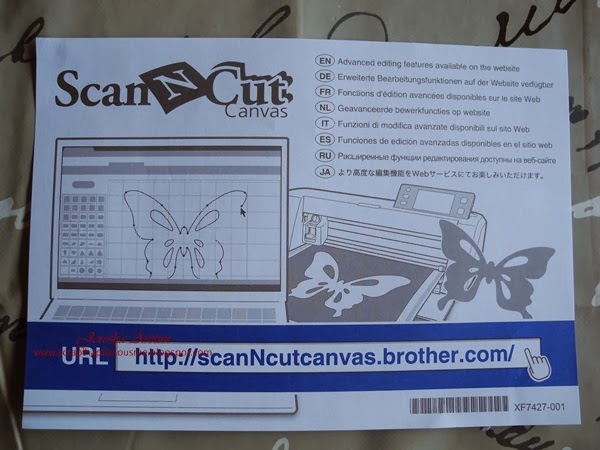
 Aside from that you will find the Operating Manual in CD form, Quick Reference Guide, ScanNCut Canvas info, List with details of the accessory,  the product safety guide written in different languages, a warranty card.   OOOpppsss there it is - the fabric applique sheet beside the CD Operating Manual!


You will also get the Basic Quilting Guide and I find it very useful especially for those who haven't tried quilting or sewing =)   And of course the booklet of all the images built-in the machine.  Patterns/images varies depending on the model you will buy or bought.


Note:  The above booklets I will show details on my next post so hang on =)

Now, let's check the baby!!!!  there she is nicely and safely packed =)


She's a real beauty.  I haven't removed the seal so naturally i haven't tried the machine yet.  Hopefully this week-end =)


Happy week-end everyone!

Eeekkkk I almost forgot - yes AC Adapter and a power cord are included, too =)

0

Impulse Buying to Cure the Blues

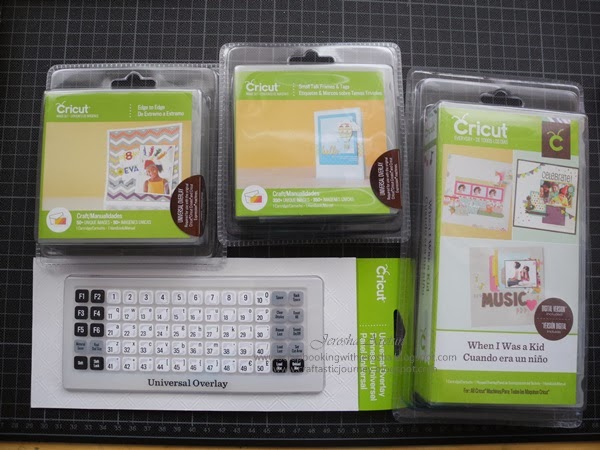
With so much going on in my craft zones I totally forgot that I've got 3 NEW Cricut Cartridges which I got last 23rd of January this year.  The truth is it was a snowy day and I'm all alone at home feeling blue and buying something normally makes my mood glad and such gladness would last the whole day feeling the excitement as to when the package will arrive.  Well, I'm glad I did buy it out of impulse coz looking at the cuts one can make is really awesome.  I even had no idea that new cartridges being sold does not have the overlay and having said that one has to buy a separate Universal Overlay.  Whew!  I actually bought it,too, because it was on sale - practically paying nothing at all and thinking that maybe someday I need it.  Little did I know that I really need it to use my new bought cartridges.


Small Talk Frames & Tags is actually my favorite now that I have scrutinized every page in the booklet.  It is just so perfect for my Project Life.  The question is will I not be lazy to make some cuts soon?, haist!  I'm not really lazy - it's just that so much going on in my life that I tend to do easier craft tasks with my limited free time.  Yeah, I have to dwell on making cuts from this cartridge for one day sooner or later coz the images are truly perfect for Project Life.


Edge To Edge -  it's very inspiring to cut my own stencils using this cartridge.  Each cut is truly unique in it's own way.  Well, the same way with my Paper Lace 1 and 2 cartridges I can cut stencils but in edge to edge the images I see are truly different.

 
When I Was a Kid Cricut Circle Membership - I bought it because it's been 4 years now that I don't do scrapbooking.  Bad, right?  I'm just tired everyday that conceptualizing my layout I end up falling asleep.  So, maybe just maybe with this cartridge scrapbooking part of my son's childhood years will help me.    Oh my I didn't even know that there are 2 kinds of this cart :  the Cricut Circle Membership and Cricut® Everyday Cartridge, When I Was a Kid.  The one I bought states that Digital Version included and Cricut Membership logo.  Hhhmmm so does it mean my cart has more cuts than the other kind?  I don't know - I have to find that out one of these days.


So there you go!  What winter blues can do to me!!!!


0

Finally I have a Typewriter

I'm just in Awe! Sometimes asking around really helps!

Just 20 minutes ago I bought a TYPEWRITER to an old lady and I paid her only for 100 kronor. My happiness is just too much right this moment because for years I really wanted to have a typewriter. Buying a new one which by the way one can only buy electric ones costs a lot of money. If ever you see ordinary typewriter for sale you have to go through bidding which I really hate.  Last December I bought 2 items at second hand market in Gottsunda and I told the old lady that I really wish for a typewriter. She asked for my home number and says she will check her dead husband's typewriter if it is still working. This morning I got a call from her and hurriedly went out to meet her. Amazingly the typewriter is just like a brand new one and all keys are working even the bag is in perfect condition. Now, as for the ribbon - it is still being sold in office supplies thru internet but I am not worried about that because my dad taught me how to re-ink old typewriter ribbons using india ink. Now, I can use the typewriter for my Project Life albums, yippee!! No measuring or waste of ink and cardstock using printer.


0

LOOPDEEDOO Bracelet Machine

During my window shopping last September 2013, I saw in a craft store a Loodeedoo bracelet machine and it was the last one.  I grab it without knowing how it works and paid for it.  I have no time in making bracelets and I notice that friendship bracelet is beginning to be popular at my son's school.  I tried to browse the internet and here's what I found out from Anne Williams .. it says
"Design your own friendship bracelets then make them in minutes with the Loopdedoo™ spinning loom. It's fast, easy and fun. Just wrap your threads around the Loopdedoo device, turn the knob, guide the thread and minutes later you’re done! You can even make necklaces, anklets, belts and more. There's no pattern to follow so each accessory is completely different and unique, just like you and your friends. You can use as many threads and color combinations as you like and you can make them thick, thin or anywhere in between. The design possibilities are endless, so let your creativity be your guide."


What it says is true!  In minutes one will be able to make bracelets =)  Oh yeah, I did made a lot  in one sitting less than an hour for my son and his close friends plus my step-daughter, too.


2

Project Life, Envelope Punch Board and few More New Goodies for this day!

Whew!  I really missed craft shopping for a month.  I was totally deprived of shopping such items while we were in Italy for a month BUT I admit I did buy few cutie items in Rome and loads of handbags and dresses from other parts in Italy.

This day my hoarding paid off - goodies has arrived, yippee!!!  I'm sssssssssoooooooo happy that Project Life is now available in few of my fave Swedish craft sites.  I used to order direct in UK but really the shipping costs a fortune :(  Now, just a click away I can avail of PL items if they are not sold out.

The truth is I'm actually looking for the We R Memory Keepers 3x4 punch card and ALL SOLD OUT anywhere :(  I'm eyeing the straight corner punch coz I have a corner chomp tool should I prefer a round edge but very very hard to find coz mostly what I have seen is the rounded corner :(  PATIENCE is a virtue so I will wait patiently until next month for such tool to be available once again in Sweden.  Heniweys, while searching for the said punch I came across a lot of items like the Project Life then the Envelope Punch Board then the dies then SMASH book journal which after checking I still don't have in my stash.  Yes, I hae ALL the SMASH book journal but not the mini nor the large ones - just the regular size =)  I have the Enveloper but just can't find it anywhere so the Envelope Punch Board saves my day.  Haist!

I had to pick up 4 packages at DHL point near our home and one is super heavy since I ordered almost all the Core Kits available at Scrapbruket.com =)  I say almost all coz I have other core kits and mini kits which I ordered from UK months ago.

I rarely show in my site my new craft goodies but this time I just thought I'd share it.  Here's my hoarding for this week =)


 I really wonder if my  envelope punch board has the right measurements coz I have read reviews that first batches had errors in measurement .... crossing my fingers that I bought the updated version if ever there is.  Well, if not then hopefully someone out there posted the right measurements =)

Oh see that accordion album die?  I almost cried and got exhausted finding it coz anywhere it was sold out then on my last try of searching I encountered a Swedish craft selling site which states "in stock" =)

That's it fellow crafters. 
6

My Silhouette Portrait Cutting Machine Has Arrived + REVIEW !!!!

Super elated!  that's how I felt when I finally got my Silhouette Portrait plus accessories last 10th of January.  I bought it at Scrapbruket, a Swedish on-line store.  One thing nice about my unit is that it's perfect for Swedish sockets since it has a cable for such. 

Oh yeah I did play with it as soon as I was able to set-it-up in my craft room.  Why I bought the machine when in fact I have the Cricut Expressions and 120 cartridges to date?  All because of one simple reason :  I will be able to use all the fonts I have in my PC, cool!  I'd rather invest on Silhouette than invest on font Cricut cartridges.  I really promise myself that I will refrain from buying cuts for my Silhouette unless of course a specific cut I can't do nor find in my Cricut cartridges.


Lessons learned:

Don't be too excited when trying out the machine for the first time hahahahahahaha coz you will end up making few mistakes!


*  I actually tried one of my fonts and I was in awe but remember:  Relax while removing the cuts coz you will get a kind'a rough result even if you used the right pressure in cutting =)

*  Read calmly the things you have to click before cutting.  I made a mistake by just pressing the cut button - forgetting that I'm using the inks.  See, I got lines!  I have to click some buttons for adjusting but was too excited!

So far I encountered only 2 mistakes which I will avoid next time.

See how compact it is beside my Cricut Expressions and it's not bulky at all :


My Silhouette has a cover so one of these days I have to make a cover for my Cricut, too.


0

My Inkadinkado Stamping Gear DeLuxe has Finally Arrived!

A fellow crafter several months ago informed me about this and I really want one.  Patience is a virtue indeed because I have to wait a very long time to get hold of my gear because either it's sold out via internet or still not available here in Sweden.  I literally contacted all my suppliers here in Sweden and requested for one.  And so last Friday, it was delivered, yipee!!!!  I am so much in awe when I got it coz I know a lot of designs can be made using this tool in my art journals, layouts, packaging, etc., etc., etc.

I bought the Deluxe Kit so I have a complete set.  I've seen that one can buy by parts, too =)


What exactly is it?  Well, according to Inkadinkado's press releaase, it says:


Create beautiful, symmetrical patterns with Inkadinkado's Stamping Gear. Create endless designs for cards and papercrafting, home décor, fashion and more. This Stamping Gear Deluxe Kit is designed especially to maximize the design potential of Stamping Gear with a great collection of tools and stamps!


What is included in the Deluxe Kit?

The Stamping Gear Deluxe Kit includes:
• Circle wheel
• Oval wheel
• Circle cog
• Oval cog
• Clear paddle for mounting your stamps
• Four 4" x 4" sheets of cling stamps, 18 stamps total


How do you use it?  Here's an overview by Inkadinkado:

To use, mount a stamp onto the Stamping Gear clear paddle, then stamp the image around your choice of the circle and oval cogs and wheels. A variety of illustrated techniques and helpful information is available in our downloadable General Tips and Techniques. Take your stamping to a new level with our unique Stamping Gear!

Here's a video clip, too!


 I'm so excited to play with my gear =)


Back to Top